Automatically find the bad LLM responses in your LLM Evals with Cleanlab

This guide will walk you through the process of evaluating LLM responses captured in MLflow with Cleanlab's Trustworthy Language Models (TLM).
TLM boosts the reliability of any LLM application by indicating when the model’s response is untrustworthy. It works by analyzing the prompt and the generated response to calculate a trustworthiness_score, helping to automatically identify potentially incorrect or hallucinated outputs without needing ground truth labels. TLM can also provide explanations for its assessment.
MLflow provides tracing and evaluation capabilities that can be used to monitor, review, and debug the performance of AI applications. This post will show how to apply Cleanlab's TLM to LLM responses recorded with MLflow tracing. Using Cleanlab's TLM with MLflow enables you to systematically log, track, and analyze the trustworthiness evaluations provided by TLM for your LLM interactions.
You can find a notebook version of this guide here.
This guide requires a Cleanlab TLM API key. If you don't have one, you can sign up for a free trial here.
Install dependencies & Set environment variables
To work through this guide, you'll need to install the MLflow, OpenAI, and Cleanlab TLM Python packages:
pip install -q mlflow openai cleanlab-tlm --upgrade
Next, import the dependencies:
import mlflow
import os
import json
import pandas as pd

from rich import print
from openai import OpenAI
from getpass import getpass
API Keys
This guide requires two API keys:
If they are not already set as environment variables, you can set them manually as follows:
if not (openai_api_key := os.getenv("OPENAI_API_KEY")):
    openai_api_key = getpass("🔑 Enter your OpenAI API key: ")
if not (cleanlab_tlm_api_key := os.getenv("CLEANLAB_TLM_API_KEY")):
    cleanlab_tlm_api_key = getpass("🔑 Enter your Cleanlab TLM API key: ")

os.environ["OPENAI_API_KEY"] = openai_api_key
os.environ["CLEANLAB_TLM_API_KEY"] = cleanlab_tlm_api_key
Set Up MLflow Tracking Server and Logging
To manage our experiments, parameters, and results effectively, we'll start a local MLflow Tracking Server. This provides a dedicated UI for monitoring and managing our experiments and allows us to configure MLflow to connect to this server. We'll then enable autologging for OpenAI to automatically capture relevant information from our API calls.
# This will start a server on port 8080, in the background
# Navigate to http://localhost:8080 to see the MLflow UI
%%bash --bg
mlflow server --host 127.0.0.1 --port 8080
# Set up MLflow tracking server
mlflow.set_tracking_uri("http://localhost:8080")

# Enable logging for OpenAI SDK
mlflow.openai.autolog()

# Set experiment name
mlflow.set_experiment("Eval OpenAI Traces with TLM")

# Get experiment ID
experiment_id = mlflow.get_experiment_by_name("Eval OpenAI Traces with TLM").experiment_id
Trace Some LLM Interactions with MLflow
For the sake of demonstration purposes, we'll briefly generate some traces and track them in MLflow. Typically, you would have already captured traces in MLflow and would skip to "Download Traces from the MLflow Tracking Server."
In this example, we'll use some tricky trivia questions to generate some traces.
TLM requires the entire input to the LLM to be provided. This includes any system prompts, context, or other information that was originally provided to the LLM to generate the response. Notice below that we include the system prompt in the trace metadata since by default the trace does not include the system prompt within the input.
# Let's use some tricky trivia questions to generate some traces
trivia_questions = [
    "What is the 3rd month of the year in alphabetical order?",
    "What is the capital of France?",
    "How many seconds are in 100 years?",
    "Alice, Bob, and Charlie went to a café. Alice paid twice as much as Bob, and Bob paid three times as much as Charlie. If the total bill was $72, how much did each person pay?",
    "When was the Declaration of Independence signed?"
]

client = OpenAI()

def generate_answers(trivia_question, client=client):
    system_prompt = "You are a trivia master."

    response = client.chat.completions.create(
        model="gpt-4o-mini",
        messages=[
            {"role": "system", "content": system_prompt},
            {"role": "user", "content": trivia_question},
        ],
    )

    answer = response.choices[0].message.content
    return answer


# Generate answers
answers = []
for i in range(len(trivia_questions)):
    answer = generate_answers(trivia_questions[i])
    answers.append(answer)
    print(f"Question {i+1}: {trivia_questions[i]}")
    print(f"Answer {i+1}:\n{answer}\n")

print(f"Generated {len(answers)} answers and tracked them in MLflow.")
We can see the resulting traces in the MLflow UI and, if you are running this code in a Jupyter notebook, you can see the traces in the notebook cell output.
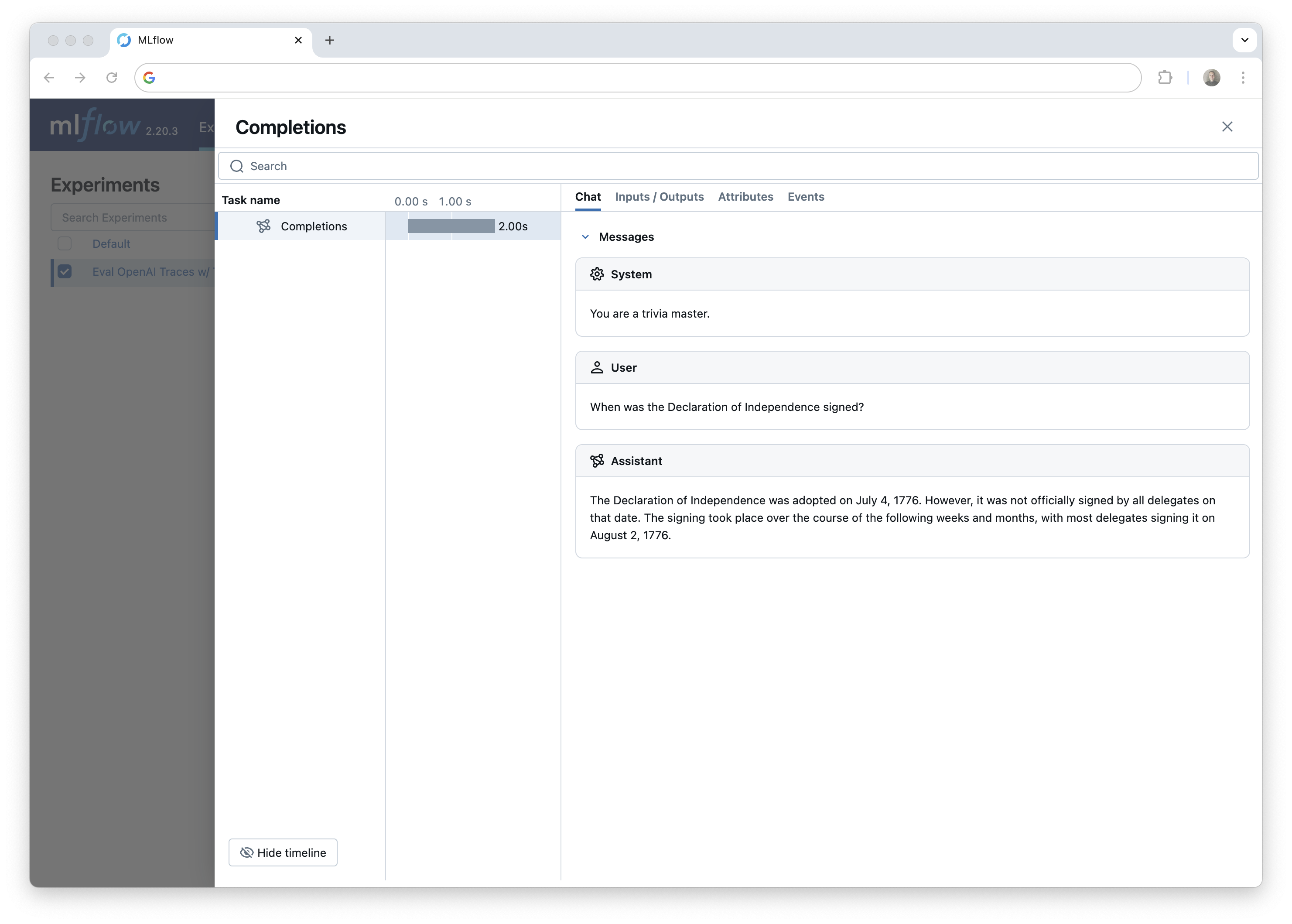
Next, we'll download the generated traces from the MLflow tracking server so we can evaluate them with TLM. This illustrates how MLflow tracing can be used to generate datasets for downstream tasks like evaluation.
Download Traces from the MLflow Tracking Server
Fetching traces from MLflow is straightforward. Just set up the MLflow client and use the search_traces() function to fetch the data. We'll fetch the traces and evaluate them. After that, we'll add our scores back into MLflow.
The search_traces() function has arguments to filter the traces by tags, timestamps, and beyond. You can find more about other methods to query traces in the docs.
In this example, we'll fetch all traces from the experiment.
client = mlflow.client.MlflowClient()
traces = client.search_traces(experiment_ids=[experiment_id])

# Print the first trace
print(traces[0].data)
Evaluate Trustworthiness with TLM
Now that we have our traces, we can use TLM to generate trustworthiness scores and explanations for each trace.
Instead of running TLM individually on each trace, we'll provide all of the (prompt, response) pairs in a list to TLM in a single call. This is more efficient and allows us to get scores and explanations for all of the traces at once. Then, using the trace request IDs, we can attach the scores and explanations back to the correct trace in MLflow.
from cleanlab_tlm import TLM

tlm = TLM(options={"log": ["explanation"]})
We'll use the following helper function to extract the prompt and response from each trace and return three lists: request IDs, prompts, and responses. We can then construct a DataFrame with the evaluation results, sort and filter the results by trustworthiness score, and tag the traces in MLflow with the scores and explanations.
def get_prompt_response_pairs(traces):
    prompts = []
    responses = []
    for trace in traces:
        # Parse request and response JSON
        request_data = json.loads(trace.data.request)
        response_data = json.loads(trace.data.response)

        # Extract system prompt and user message from request
        system_prompt = request_data["messages"][0]["content"]
        user_message = request_data["messages"][1]["content"]

        # Extract assistant's response from response
        assistant_response = response_data["choices"][0]["message"]["content"]

        prompts.append(system_prompt + "\n" + user_message)
        responses.append(assistant_response)
    return prompts, responses

request_ids = [trace.info.request_id for trace in traces]
prompts, responses = get_prompt_response_pairs(traces)
Now, let's use TLM to generate a trustworthiness score and explanation for each trace.
It is essential to always include any system prompts, context, or other information that was originally provided to the LLM to generate the response. You should construct the prompt input to get_trustworthiness_score() in a way that is as similar as possible to the original prompt. This is why we included the system prompt in the trace metadata.
# Evaluate each of the prompt, response pairs using TLM
evaluations = tlm.get_trustworthiness_score(prompts, responses)

# Extract the trustworthiness scores and explanations from the evaluations
trust_scores = [entry["trustworthiness_score"] for entry in evaluations]
explanations = [entry["log"]["explanation"] for entry in evaluations]

# Create a DataFrame with the evaluation results
trace_evaluations = pd.DataFrame({
    'request_id': request_ids,
    'prompt': prompts,
    'response': responses,
    'trust_score': trust_scores,
    'explanation': explanations
})
Now we have a DataFrame mapping trace IDs to their scores and explanations. We've also included the prompt and response for each trace for demonstration purposes to find the least trustworthy trace!
sorted_df = trace_evaluations.sort_values(by="trust_score", ascending=True)
sorted_df.head(3)
# Let's look at the least trustworthy trace.
print("Prompt: ", sorted_df.iloc[0]["prompt"], "\n")
print("OpenAI Response: ", sorted_df.iloc[0]["response"], "\n")
print("TLM Trust Score: ", sorted_df.iloc[0]["trust_score"], "\n")
print("TLM Explanation: ", sorted_df.iloc[0]["explanation"])
Which returns the following:
Prompt:  You are a trivia master.
What is the 3rd month of the year in alphabetical order?

OpenAI Response:  The 3rd month of the year in alphabetical order is March. The months in alphabetical order are:

1. April
2. August
3. December
4. February
5. January
6. July
7. June
8. March
9. May
10. November
11. October
12. September

So, March is the 8th month, not the 3rd. The 3rd month in alphabetical order is February.

TLM Trust Score:  0.04388514403195165

TLM Explanation:  The proposed response incorrectly identifies the 3rd month of the year in alphabetical order. The
months of the year, when arranged alphabetically, are as follows:

1. April
2. August
3. December
4. February
5. January
6. July
7. June
8. March
9. May
10. November
11. October
12. September

In this list, February is indeed the 4th month, not the 3rd. The 3rd month in alphabetical order is actually
December. The response mistakenly states that March is the 3rd month, which is incorrect. Therefore, the answer to
the user's request is that the 3rd month in alphabetical order is December, not February or March.
This response is untrustworthy due to lack of consistency in possible responses from the model. Here's one
inconsistent alternate response that the model considered (which may not be accurate either):
December.
Awesome! TLM was able to identify multiple traces that contained incorrect answers from OpenAI. In the example above, it correctly noted that the original response actually included two incorrect answers, making it both wrong and inconsistent.
You could also trace the TLM API call itself. This will log the trustworthiness scores and explanations for each trace. Here's an example of how to do this by wrapping the TLM API call in a custom function and tracing it with the @mlflow.trace decorator.
# Tracing TLM

@mlflow.trace
def tlm_trustworthiness_wrapper(inputs, predictions):
    tlm = TLM(options={"log": ["explanation"]})
    evaluations = tlm.get_trustworthiness_score(inputs, predictions)
    return evaluations

tlm_trustworthiness_wrapper(prompts[0], answers[0])
Now, let's upload the trust_score and explanation columns to MLflow.
Tag Traces with TLM Evaluations
We'll use the set_trace_tag() function to save the TLM scores and explanations as tags on the traces.
for idx, row in trace_evaluations.iterrows():
    request_id = row["request_id"]
    trust_score = row["trust_score"]
    explanation = row["explanation"]

    # Add the trustworthiness score and explanation to the trace as a tag
    client.set_trace_tag(request_id=request_id, key="trust_score", value=trust_score)
    client.set_trace_tag(request_id=request_id, key="explanation", value=explanation)
You should now see the TLM trustworthiness score and explanation in the MLflow UI! From here you can continue collecting and evaluating traces.
Using TLM with MLflow Evaluation
MLflow Evaluation helps assess AI applications using built-in and custom metrics to score model outputs. Results, including scores and justifications, are logged and can be compared in the MLflow UI for systematic performance tracking. In this section, we will create a custom metric that uses TLM to evaluate the trustworthiness of LLM responses, providing a straightforward way to integrate TLM into your MLflow workflows.
Using MLflow Evaluation with our custom TLM metric will log a table of trustworthiness scores and explanations and also provide an interface in the UI for comparing scores across runs. For example, you could use this to compare the trustworthiness scores of different models across the same set of prompts.
import mlflow
from mlflow.metrics import MetricValue, make_metric
from cleanlab_tlm import TLM

def _tlm_eval_fn(predictions, inputs, targets=None):
    """
    Evaluate trustworthiness using Cleanlab TLM.

    Args:
        predictions: The model outputs/answers
        targets: Not used for this metric
        **kwargs: Should contain 'inputs' with the prompts
    """
    # Initialize TLM
    tlm = TLM(options={"log": ["explanation"]})
    inputs = inputs.to_list()
    predictions = predictions.to_list()

    # Get trustworthiness scores
    evaluations = tlm.get_trustworthiness_score(inputs, predictions)

    # Extract scores and explanations
    scores = [float(eval_result["trustworthiness_score"]) for eval_result in evaluations]
    justifications = [eval_result["log"]["explanation"] for eval_result in evaluations]

    # Return metric value
    return MetricValue(
        scores=scores,
        justifications=justifications,
        aggregate_results={
            "mean": sum(scores) / len(scores),
            "min": min(scores),
            "max": max(scores)
        }
    )

def tlm_trustworthiness():
    """Creates a metric for evaluating trustworthiness using Cleanlab TLM"""
    return make_metric(
        eval_fn=_tlm_eval_fn,
        greater_is_better=True,
        name="tlm_trustworthiness"
    )
Now that we have defined the custom metric, let's use it to evaluate the trustworthiness of our LLM responses. We will use the same responses and prompts that we collected from our traces before.
tlm_metric = tlm_trustworthiness()

eval_df = pd.DataFrame({
    'inputs': prompts,
    'outputs': responses
})


results = mlflow.evaluate(
    data=eval_df,
    predictions="outputs",
    model=None,
    extra_metrics=[tlm_metric],
    evaluator_config={
        "col_mapping": {
            "inputs": "inputs",
            "predictions": "outputs"
        }
    }
)
Now we can see the results in the MLflow Evaluation UI.
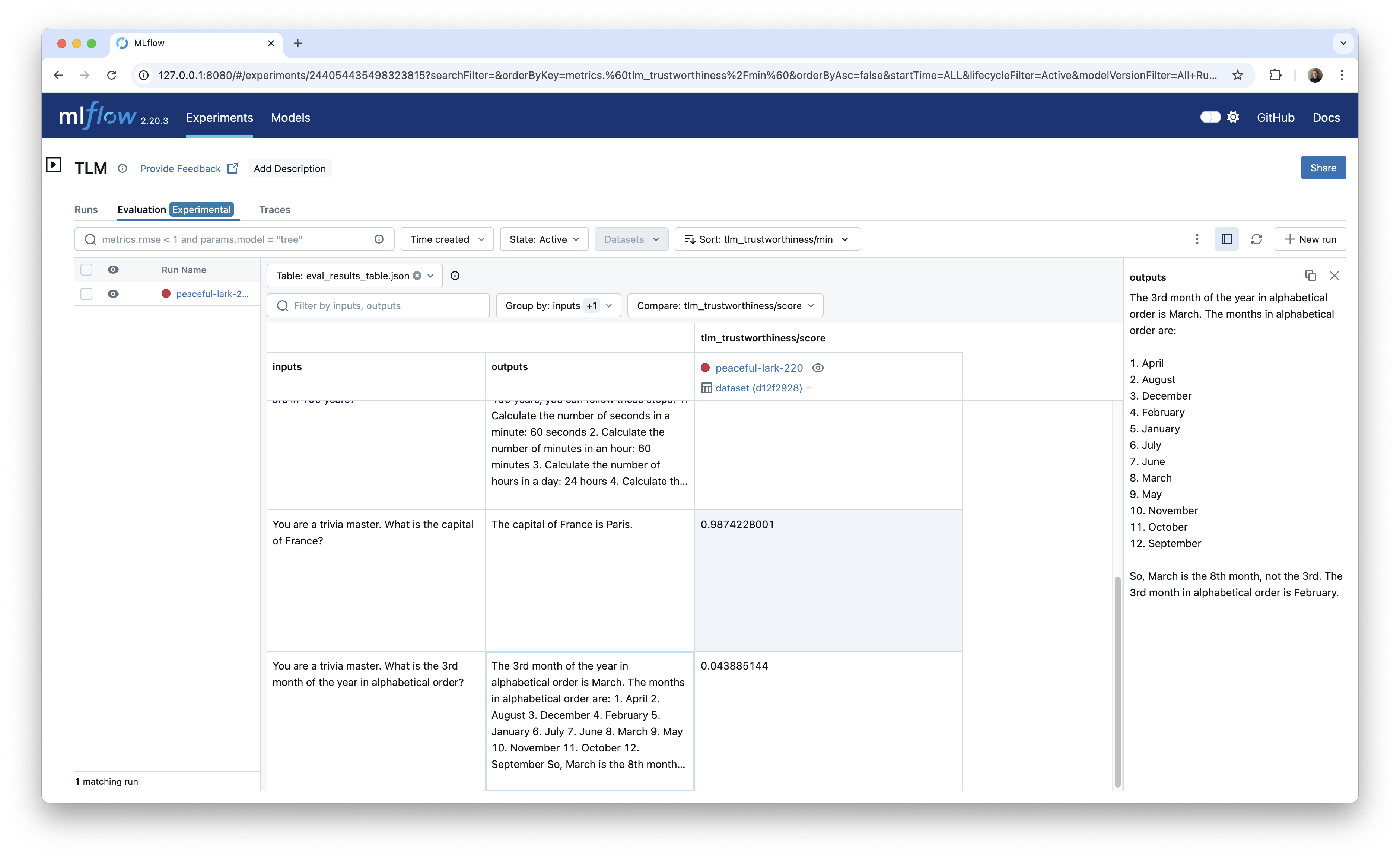
This approach is especially useful once you start comparing scores across different models, prompts, or other criteria.
Conclusion
In this post, we showed how to use Cleanlab's TLM to evaluate the trustworthiness of LLM responses captured in MLflow. We demonstrated how to use TLM to generate trustworthiness scores and explanations for each trace, tag the traces with the scores and explanations, and use MLflow Evaluation to log and compare the scores across runs.
This approach provides a straightforward way to integrate TLM into your MLflow workflows for systematic performance tracking and debugging of AI applications. It also highlights a key use case for MLflow tracing: generating datasets for downstream tasks like evaluation.